
Campaigns, Discounts, Coupons
Does Dinolingo Offer Discounts, Coupons, or Special Promotions?
Yes! Dinolingo occasionally offers special discounts and promotional campaigns for new and existing customers.
How to Find Current Discounts
- Visit Dinolingo.com.
- If a promotion is available, you'll see a campaign banner at the top of our website.
- The banner will display the discount and coupon code, such as EXAMPLE20.
- If there's no banner, we're not currently running a promotional campaign.

Where can coupon codes be used?
Coupon codes can be used for eligible purchases made directly on the Dinolingo website using a credit or debit card.
They cannot be used for purchases through Paypal, Apple App Store or Google Play Store. Some restrictions may apply.
For New Customers: How to Apply a Discount Code
- Visit our Registration Page.
- Enter your information to start your 7-day free trial.
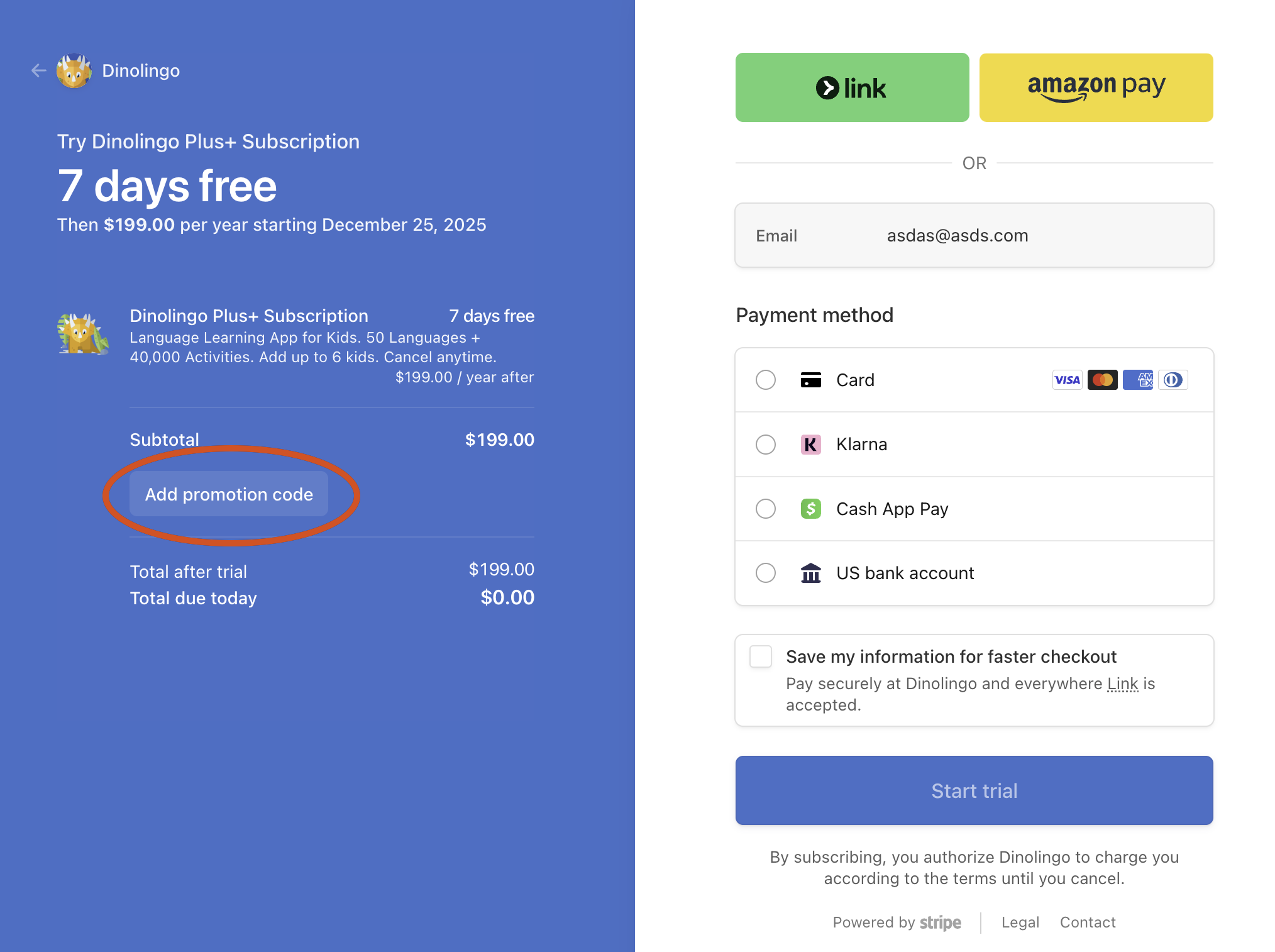
- On Step 3, select Credit/Debit Card as your payment method.
- Click Add Promotion Code. (See screenshot below)
- Enter your coupon code and apply it.
-
Make sure your discount appears before completing registration.
For Existing Customers: How to Get a Discount While Your Subscription Is Still Active
While discount codes can't be applied to active subscriptions, we'd love for you to enjoy the savings! If you have an active Dinolingo subscription but don't want to miss a limited-time discount, you can purchase a 1-year gift subscription now and redeem it later.
Step 1: Purchase a Gift Subscription
- Go to the Dinolingo website and select 1-Year Gift Subscription.
- Enter your discount code at checkout and complete your purchase.
- You'll receive an email containing your gift redemption code.
- Keep this code safe. Do not redeem it yet.

Step 2: Cancel Your Current Subscription
- Return to your Dinolingo Dashboard.
- Cancel your subscription anytime before its next renewal date to avoid being charged again.
- Your subscription will remain active until the end of your current paid billing period. You can continue using Dinolingo during this time.
- Wait until your subscription has fully expired before redeeming your gift code.
Step 3: Redeem Your Gift Subscription
- Once your current subscription expires, log in to your Dashboard.
- Click Subscribe.
- Select Redeem Gift Code.
- Enter the gift code you received by email.
That's it! Your new 1-year Dinolingo subscription will begin.
Important: Canceling does not immediately end your access. You can cancel right after purchasing your gift subscription, but you should wait until your existing subscription expires before redeeming the gift code. Gift subscriptions do not automatically renew.
Frequently Asked Questions
Can I apply a coupon code to my next renewal?
No. You must cancel your current subscription, wait until it expires, and then resubscribe using a valid coupon code.
Can I switch from a monthly to an annual subscription?
Yes! Once your current subscription expires, you can choose a different plan and apply an eligible coupon code at checkout.
Will I lose access when I cancel?
No. You can continue using Dinolingo until your current paid subscription period ends.
Can I use Dinolingo coupon codes in the iOS or Android app?
No. Website promotional codes are only available for eligible purchases completed directly through Dinolingo's website, not through Apple or Google Play.
Can I use a coupon code for a gift subscription?
Yes, if the promotion includes gift purchases. Select the gift subscription option on our website and apply the code during checkout.

What if my coupon code doesn't work?
Make sure the code is entered correctly, is still valid, and applies to your selected plan.
If you need assistance, please contact our support team. We're always happy to help!
Dinolingo iOS and Android Apps:
Both apps are already discounted at this time, no need to enter a discount code.
Start your 7-Day Free Trial via the Dinolingo iOS App (on the App Store).
If I subscribe on your Android app or website with or without a discount code, can I use the iOS app?
Absolutely! All Dinolingo subscriptions work across all platforms. Just log in with the same email and password to access your account on the iOS app, Android app, or website—no matter where you subscribed.